


The Thrill login connects registered users to the full platform from one account. After signing in, players can open the casino lobby, browse sports and esports markets, manage crypto payments, check available promotions, and view rewards earned through eligible activity.
The same account can be used on desktop computers, tablets, and mobile browsers. There is no separate login for casino games, sports betting, the wallet, or the rewards section.
For account security, credentials should only be entered on the official Thrill website. Players should check the address before signing in, particularly when arriving through advertisements, search results, or third-party promotional pages.
How to Log In to Thrill Casino
Accessing an existing account takes three steps:
- Open the official Thrill website in any browser — no download required
- Click the Login button in the top right corner
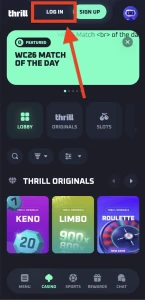
- Enter the registered email and password, or sign in with one click through a connected Google account
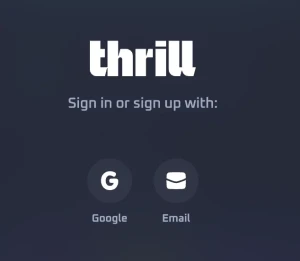
Once the Thrill login is complete, players can access their wallet, available promotions, rakeback, VIP status, casino games, and sportsbook markets from the main account dashboard. On recognised personal devices, an active session may allow quicker access on future visits.
Account details should only be entered on the official Thrill website. Unauthorised copies of login pages may be designed to collect passwords or other sensitive information. Saving the verified address as a bookmark helps reduce the risk of opening an unsafe link.
New to Thrill? Create an Account
Players who have not yet registered can create a Thrill account through a short online form. The process is designed to be straightforward and begins with the basic details required to set up an account:
- Click Sign Up on the homepage
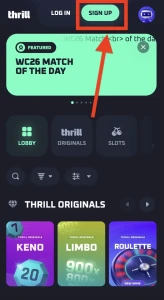
- Register with an email and password, or connect a Google account instantly
- Choose a username — this is the only name other players will ever see
- Start playing — the full platform unlocks immediately
No deposit is required to create an account, browse the lobby, or test games in demo mode. The same credentials are then used for every future Thrill login on any device.
Recovering a Forgotten Thrill Password
Losing a password does not require another registration. The recovery option on the Thrill login screen can be used to create new credentials for the existing account.
A password reset request is sent to the email address connected to the profile. The message contains a secure link that allows the account holder to choose a new password.
When the recovery email is not visible, players should check the spam folder and confirm that the correct address was entered. Sending several requests in quick succession may invalidate older links, so the most recent message should be used.
Support may be required when the registered email address is no longer accessible or when the automated recovery process does not resolve the problem. Account ownership may need to be confirmed before login details can be changed.
Creating a second profile should be avoided. Duplicate accounts can cause payment, verification, and bonus eligibility issues.
Securing a Thrill Account with 2FA
Two-factor authentication adds a second security step to the standard password. When 2FA is enabled, signing in requires a temporary code generated by a compatible authenticator application.
This reduces the risk of unauthorised access if a password is exposed, reused, or guessed. Without the current authentication code, the password alone should not provide access to the protected account.
Players should also follow several basic security practices:
- Create a unique password for Thrill
- Avoid reusing credentials from other websites
- Never disclose passwords or authentication codes
- Sign out after using a shared device
- Review unfamiliar account activity immediately
- Keep the registered email account secure
Thrill support should not need a full password or an authenticator code to investigate a general account issue. Requests for highly sensitive credentials should be treated with caution.
If the device containing the authenticator application is lost, the account holder may need assistance from support. Additional information can be requested to verify ownership before 2FA is removed or replaced.
Fixing Common Thrill Login Problems
A failed sign-in does not always indicate a problem with the account. Many login errors are caused by incorrect credentials, browser settings, or expired sessions.
Email or Password Is Not Accepted
Check the email address for typing mistakes, remove accidental spaces, and confirm that Caps Lock is not affecting the password. Using the recovery option is safer than repeatedly guessing.
Account Is Temporarily Locked
Several unsuccessful login attempts may activate a temporary security restriction. Waiting before trying again can resolve the issue. Support may assist when access remains blocked.
The 2FA Code Does Not Work
Authenticator codes change frequently and depend on the device clock. Setting the phone’s date and time to update automatically can correct synchronisation problems.
Login Page Does Not Load
Clearing the browser cache, disabling conflicting extensions, checking the internet connection, or opening the site in another browser may help. Access can also be affected by location-based restrictions.
Third-Party Sign-In Fails
An account created through a supported external login method should normally be accessed using the same option. Entering an email and password may not work unless separate credentials were created later.
Privacy and Account Verification
Thrill limits the public information connected to an account. Other players generally interact with the selected username rather than the account holder’s real identity.
Crypto deposits and withdrawals are processed through blockchain transactions rather than appearing as conventional casino payments on a bank statement. However, blockchain transfers remain publicly traceable through wallet addresses and transaction records.
Identity verification is not necessarily required during every login. It may still be requested in specific cases involving account security, payment reviews, legal requirements, age checks, or other compliance procedures.
Players should therefore provide accurate registration information and keep account details current. A verification request can be more difficult to complete when names, dates, or contact information do not match the original profile.
Getting Help with Thrill Account Access
Login issues that cannot be resolved through password recovery or browser troubleshooting should be referred to official Thrill support. The support team can assist with restricted accounts, inaccessible email addresses, 2FA recovery, verification requests, and suspicious activity.
When contacting support, players should provide a clear explanation of the issue and use the email associated with the account whenever possible. Screenshots of error messages may also help identify the cause.
Account information should only be shared through verified support channels. Passwords, wallet recovery phrases, and active authentication codes should remain private at all times.
A secure Thrill login provides access to the casino, sportsbook, wallet, rewards, and profile controls from one dashboard. Using strong credentials, enabling 2FA, and protecting the registered email address can significantly reduce the risk of account access problems.

